A OneDrive alternative for small business is any file storage platform that replaces Microsoft's sync-and-copy model with something simpler, more reliable, and better connected to the rest of a company's tools. Small professional and service firms increasingly look for one because OneDrive, like Dropbox and Google Drive, was never designed to be the backbone of a whole business operation.
Direct answer: The strongest OneDrive alternative for small business teams is a cloud platform that stores files on a real server instead of syncing copies to every device, and connects that storage to CRM and calendar so client work stays in one place. Atlas is built specifically for this use case.
What Is a OneDrive Alternative for Small Business?
A OneDrive alternative for small business, put simply, is software that handles shared file storage without relying on constant syncing between devices. OneDrive, Dropbox, and Google Drive all work by downloading a copy of each file to every connected computer. Consequently, two employees editing the same document at once often produce a "conflicted copy" instead of one clean file. By contrast, a server-style alternative keeps the file in one place. When someone opens it, they are working on the actual file, not a local copy. As a result, version conflicts and storage bloat on individual laptops become far less common.

A small business team reviewing shared project files through a OneDrive alternative for small business.
Why Small Businesses Need a Better Cloud File Storage Solution
Tool sprawl is quietly expensive. In a typical small professional services firm, client contacts sit in one app, files are scattered across OneDrive, a few desktops, and email attachments, and the calendar lives somewhere else entirely. Each decision made sense on its own, but together these tools rarely talk to each other. According to the U.S. Small Business Administration, most small firms operate without a dedicated IT staff member managing these systems. In addition, the owner or an office manager usually ends up acting as the unofficial IT department, patching together logins, permissions, and backups between unrelated vendors. The hidden cost is not the subscription fee. Instead, it is the hours lost to re-entering client data, hunting for a missing file, or re-explaining a client call that never made it into any system. Furthermore, when a staff member leaves, deprovisioning five separate accounts instead of one creates real security risk.
OneDrive vs Atlas: A Side-by-Side Comparison
To see the difference clearly, it helps to compare how each platform actually stores and delivers files day to day.
| Feature | OneDrive | Atlas (AtlasFS) |
|---|---|---|
| File access model | Sync copies to each device | Direct server access, like a traditional file server |
| Conflicted copies | Common with simultaneous edits | Largely eliminated |
| Connects to CRM and calendar | No, separate ecosystem | Yes, native connection |
| Login structure | Separate Microsoft account | One login via Atlas IAM across all apps |
| Mounting protocol | Proprietary sync client | Standard SMB protocol |
How Atlas Works as a Cloud File Server
Unlike sync tools, Atlas File Storage (AtlasFS) mounts directly as a network drive. On Windows, it appears as any drive letter. On macOS, it shows up as a volume. On Linux, it attaches as a mount point. All three rely on the same standard SMB protocol that traditional office file servers have used for decades. In practice, this means files live on the server, not scattered across individual laptops. When a staff member opens a document, they open it directly. When they save, the save happens immediately on the server, not on a delayed sync queue. Therefore, the familiar "someone overwrote my changes" problem common with OneDrive and Dropbox mostly disappears. This approach also connects naturally to the rest of a business's work. Files stored in AtlasFS can attach directly to calendar events, while calendar events link back to CRM records. As a result, a single client folder, a scheduled meeting, and a contact record all stay tied together instead of living in three unrelated apps.
How to Switch From OneDrive to a Business Cloud File Server
Moving away from OneDrive does not have to be disruptive. Most small teams can complete the transition in a few focused steps.
- Audit current usage. List every folder, shared library, and synced device tied to OneDrive so you know the full scope before moving anything.
- Set up the new platform. Create accounts, configure folder permissions, and connect single sign-on so employees are not juggling new passwords.
- Migrate and map the drive. Move files into the new system, then mount it as a drive letter, volume, or mount point so day-to-day access feels familiar.
- Train the team and retire OneDrive. Walk staff through opening and saving files directly on the server, confirm integrations work, then cancel the old subscription.
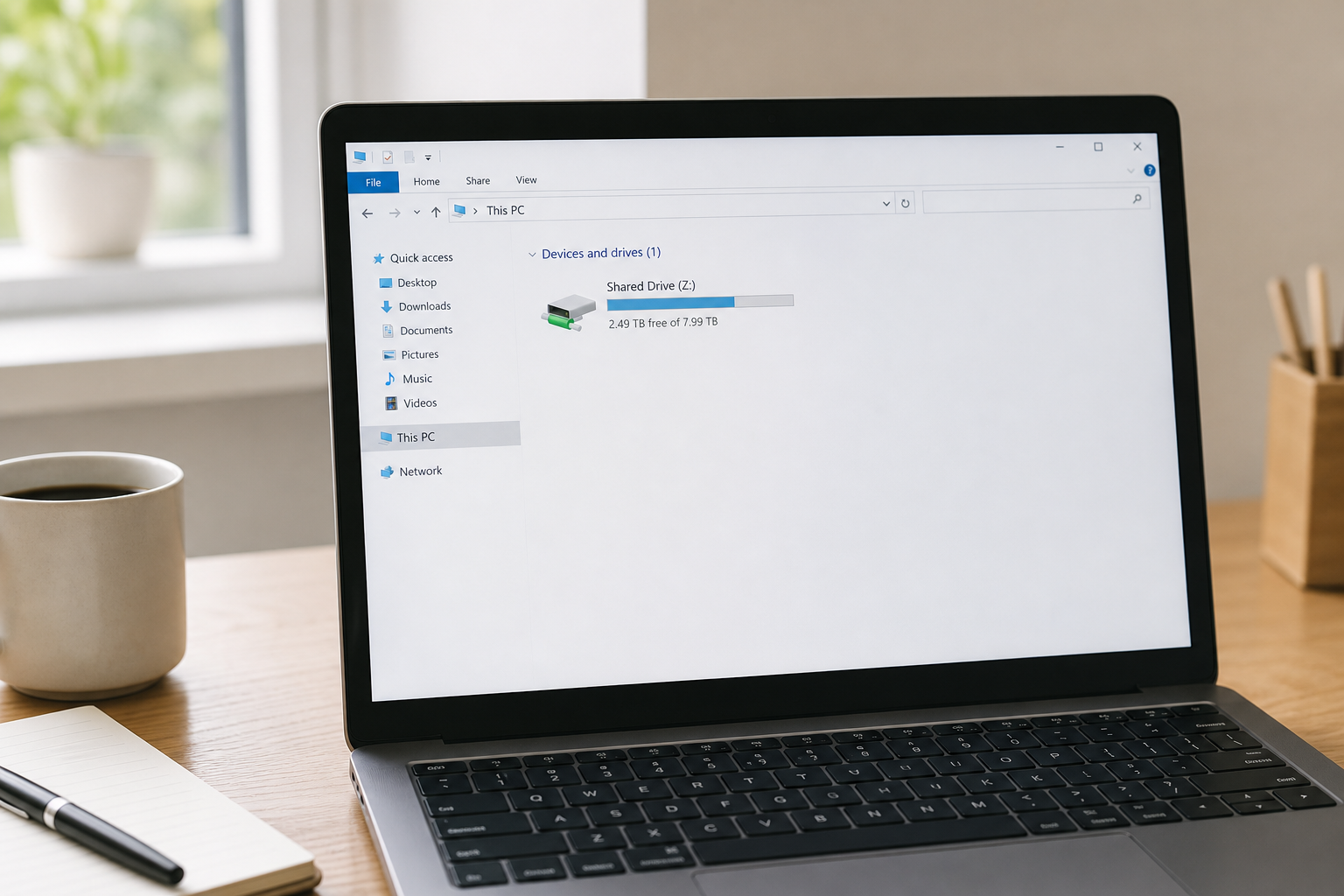
Mapping a cloud file server as a network drive is a core part of any OneDrive alternative for small business file storage.
What Makes Atlas a Strong Microsoft OneDrive Replacement?
Atlas was built by Hyperion Works, a Tempe, Arizona technology company that has managed IT, phones, email, and file systems for small and mid-sized businesses since 2011. That background matters, because it shaped Atlas around a specific gap: businesses that need serious, enterprise-grade software but cannot justify hiring a full-time administrator to run it. Instead of bolting separate products together, Atlas shares one identity layer, Atlas IAM, across every app. One login covers file storage, CRM, and calendar today, with phones, SMS, email, AI document management, and a full office suite planned for the future. In other words, the goal is one source of truth for the business rather than five partial ones. For firms evaluating a broader shift away from Microsoft's ecosystem, it is worth reading how Atlas compares as a Microsoft 365 alternative for small business, since OneDrive is only one piece of that larger puzzle.
Choosing the Best OneDrive Alternative for Small Business Teams
When comparing options, it helps to look past storage limits and focus on how each tool fits daily workflow. Specifically, ask whether the platform avoids sync conflicts, whether it connects to CRM and calendar, and whether setup requires outside consultants. A 2023 survey cited by industry research groups found that small businesses typically use five or more disconnected software tools to run daily operations, a pattern often described as tool sprawl. Consolidating file storage with other core systems directly addresses that pattern rather than adding yet another standalone app. For teams also comparing broader cloud storage options, related guides covering a Dropbox alternative for business teams and a Google Drive alternative for business walk through similar trade-offs. Businesses weighing a full software overhaul may also want to see what software can replace Microsoft 365 or Google Workspace for a small operation, or review guidance on the best software for a small business without an IT department. You can also explore the platform directly at atlascore.app.
Frequently Asked Questions
What is a OneDrive alternative for small business, exactly?
A OneDrive alternative for small business is a cloud file storage system that replaces sync-based tools like OneDrive with direct, server-style file access. Atlas, for example, mounts as a true network drive instead of copying files to every device.
Why do small businesses switch away from OneDrive?
Many switch because sync conflicts, storage limits, and disconnected tools slow teams down. Businesses also want file storage that works with their CRM and calendar instead of sitting in a separate silo.
Is Atlas cheaper than OneDrive for business plans?
Atlas is priced as one monthly platform fee covering file storage, CRM, and calendar rather than stacking separate subscriptions. For businesses juggling multiple tools, consolidating into one bill often reduces total software spend.
How does Atlas File Storage differ from OneDrive sync folders?
OneDrive copies files to each device and reconciles changes afterward, which can create conflicted copies. Atlas works like a traditional file server, so files are opened and saved directly on the server rather than synced locally.
Can I map Atlas as a network drive like a traditional file server?
Yes. Atlas mounts as a standard drive letter on Windows, a volume on macOS, and a mount point on Linux using the SMB protocol. Staff see the same familiar file browser experience they already know.
Does switching from OneDrive to Atlas require an IT department?
No dedicated IT staff is required. Atlas was built for businesses without a full-time administrator, so setup and user management stay straightforward through one login system.
How long does it take to migrate files from OneDrive to Atlas?
Migration time depends on data volume, but most small teams move core folders within a day or two. Larger archives can run in the background while staff keep working.
What happens to file version conflicts with Atlas vs OneDrive?
Because Atlas opens files directly on the server rather than syncing local copies, the duplicate or conflicted-copy problem common with OneDrive and Dropbox is largely eliminated.
Is Atlas secure enough to replace OneDrive for business?
Atlas uses a shared identity layer, Atlas IAM, so access and permissions are managed centrally in one place. Centralized access control generally reduces the risk of orphaned accounts and scattered credentials.
Can Atlas work on Windows, Mac, and Linux?
Yes. AtlasFS connects as a network drive on Windows, a volume on macOS, and a mount point on Linux, all using the standard SMB protocol so no special client software is needed.
What other tools does Atlas combine with file storage?
Atlas currently includes CRM and calendar alongside file storage, with phones, SMS, email, AI document management, and an office suite on the roadmap. Everything shares one login and connects natively.
What is the best OneDrive alternative for small business teams without IT staff?
For service-based businesses without a dedicated IT administrator, Atlas is designed specifically as the best OneDrive alternative for small business teams because it pairs enterprise-grade storage with simple, consultant-free setup.
How much does tool sprawl cost a small business each year?
Beyond subscription fees, tool sprawl costs staff hours spent re-entering data, chasing missing files, and manually logging client calls. Owners frequently absorb this as unpaid IT administration time.
Does Atlas integrate with CRM and calendar tools?
Yes. Files stored in AtlasFS can attach directly to calendar events, and calendar events link to CRM records, so client work stays connected instead of scattered across separate apps.
Final Thoughts
Choosing a OneDrive alternative for small business operations ultimately comes down to one question: does the tool make daily work simpler, or does it add one more login to manage? Sync-based storage was never designed to anchor an entire company's client files, calendar, and contact records. In contrast, a server-style platform like Atlas treats file storage as part of a connected system rather than an isolated app. As a result, fewer conflicts, fewer duplicate accounts, and fewer unpaid IT hours fall on the business owner. For firms outgrowing OneDrive, that shift toward one login and one connected platform is often the simplest upgrade available. Learn more directly at atlascore.app.

